Find video footage by describing what you need
Jumper turns your footage into a searchable visual library. Type a natural-language description and jump directly to matching moments across your media.
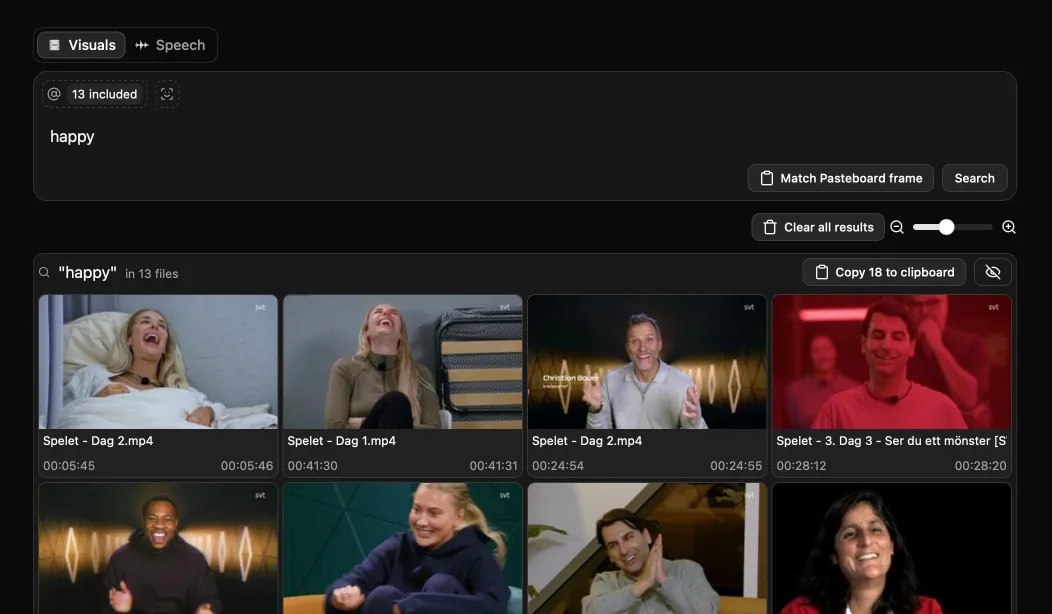
Visual Search in Jumper
Visual search in Jumper uses on-device machine-learning models to understand the content of video frames. Editors can search for shots such as “crowd applauding,” “wide shot of a city at night,” or “person opening a box” without first naming, tagging, or reorganizing every clip.
What you can do with visual search
Search without manual tags
Describe a shot, object, setting, action, or visual idea in everyday language and retrieve relevant moments from analyzed footage.
Find visually similar shots
Use an existing result or a frame from the source monitor as a visual reference to discover related footage.
Keep media on your device
Visual analysis and search run locally, so footage does not need to be uploaded to a cloud service.
How it works
- 01
Analyze footage
Add media in Jumper and run visual analysis once to make its content searchable.
- 02
Describe the shot
Enter a natural-language query and refine it until the results match the editorial need.
- 03
Use the result in the edit
Open the source moment or move selected results into the connected editing workflow.
Guides and documentation
More features
Speech Search
Jumper makes interviews, dialogue, speeches, and archive recordings searchable, so editors can find the right quote without listening through every clip.
Face Recognition
Jumper detects and groups recurring faces across analyzed media, helping editors locate cast members, interview subjects, speakers, and other people without manual logging.
Script Editor
Jumper’s Script Editor gives editors a transcript-first workspace for reviewing dialogue, selecting useful ranges, and shaping a cut before working through the timeline.
NLE Integrations
Jumper connects searchable media analysis to the editing applications professionals already use, reducing the need to leave the edit to locate a shot or spoken moment.
Questions
Does visual search require manual tagging?
No. Jumper analyzes the visual content of footage so editors can search with natural-language descriptions instead of relying on filenames, bins, or manually entered tags.
Does Jumper upload footage for visual search?
No. Jumper performs media analysis and visual search locally on the editor’s device.
Which editing applications work with Jumper?
Jumper works with Adobe Premiere Pro, Final Cut Pro, DaVinci Resolve, and Avid Media Composer, and is also available as a standalone application.