AI Video Search Tools Compared (2026): Independent Benchmark Results
Which AI video search tool finds the right shot most reliably? Iain Anderson at ProVideo Coalition put four tools through the same test: Jumper, Adobe Premiere Pro, Peakto, and Final Cut Pro 12. It is probably the first independent benchmark of AI visual search for video editors.
The results
| Rank | Tool | Score (of 92) | Accuracy |
|---|---|---|---|
| 1 | Jumper | 84 | 91.3% |
| 2 | Premiere Pro | 68 | 73.9% |
| 3 | Peakto | 51 | 55.4% |
| 4 | Final Cut Pro 12 | 50 | 54.3% |
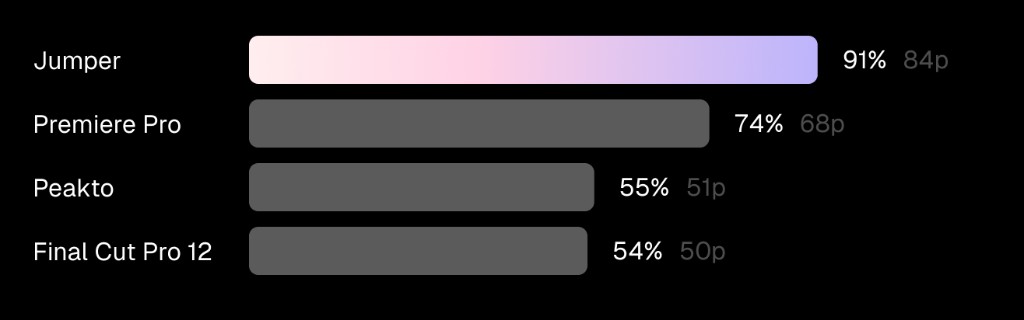
Jumper ranked first with a clear margin, 16 points ahead of second place.
How the test worked
All four tools searched the same curated dataset with 46 distinct searches covering nouns, adjectives, verbs, locations, and shot types. Each search was scored from 0 to 2:
- 2 points: found all the matching shots, mostly near the top of the results
- 1 point: found some, but not all, of the shots
- 0 points: found none of the shots
That gives a maximum of 92 points. Read the full article at ProVideo Coalition for every query and the reviewer’s notes on each tool.
What the results mean for editors
Visual search accuracy decides whether you trust the tool. If the right shot shows up near the top, you stop scrubbing. If it doesn’t, you go back to doing it by hand. A score of 91% means most everyday queries — objects, actions, places, and shot types — return what you were looking for.
Results will vary with your own footage and the way you phrase searches, so treat any benchmark as a starting point and test on your own media.
What the benchmark doesn’t cover
This test measured visual search only. When choosing an AI video search tool, editors usually weigh a few more things:
| Question | Why it matters | Jumper |
|---|---|---|
| Can it search what people say? | Interviews, podcasts, and unscripted work | Speech search in 111 languages |
| Can it find specific people? | Documentary subjects, cast members, clients | Face recognition and people search |
| Where is footage analyzed? | NDA and unreleased material | Locally, nothing uploaded |
| Does it work in my NLE? | Searching without leaving the edit | Premiere Pro, Resolve, Final Cut Pro, Avid, plus a standalone app |
| Can AI agents use it? | Automating selects and B-roll pulls | MCP server for Claude, Codex, and other agents |
| Does it scale to a team? | Shared libraries and many seats | Shared analysis and Jumper Enterprise |
How to test AI video search tools yourself
- Use your own footage, ideally a project you know well so you can judge misses.
- Write 20–30 real queries from recent jobs: objects, actions, places, shot types, and moods.
- Score them the same way as the benchmark: all, some, or none of the right shots.
- Check speed: how long analysis takes on your hardware, and how fast searches return.
- Try it in your workflow: search inside your NLE and send results to a timeline.
New to the topic? Start with what AI video search is and how editors use it.
Try Jumper free and run your own comparison on your footage.