Vibe-Coding Your Own Video Editing Tools
One of the most exciting things we’ve seen lately is that some Jumper users have started playing with the Jumper API to build their own tools, apps, and custom workflows.
That is very cool!
While we can build a lot into Jumper, there is one thing we’ll never fully know: exactly how every editor works. There are probably as many editing workflows as there are editors. Different projects, different habits, different bins, different naming conventions, different rituals, different tiny peculiarities that often are load-bearing. That is why it is so exciting to see people start “modding” Jumper.
We released the first version of the Jumper API in March 2026 and while we can’t track how many are using it or not, we’ve seen a little uptick lately in emails or conversations with people, often editors with zero programming experience, who are using the API to build their own tools.
As coding agents become more powerful, it is becoming easier and easier to build software, and while we leverage AI frequently in our development of Jumper, we never tried building something else based on the Jumper API.
So I decided to give it a try.
A quick experiment
To test this myself, I gave an AI coding agent (Claude Code in this case, but Codex, Cursor, or similar tools should work too) a simple task:
Build a small app on top of the Jumper API.
I gave it a link to the API documentation, described a rough app idea, and let it get to work.
If you want to follow along at home, here’s the exact prompt I used:
i have a jumper pro license and i want to build a simple application based on the api.
assume i have latest version installed and running, authed with my pro license… now i want you to build a small app with a search box and when i make a search i want you to populate the results/thumbnails in a visual timeline
lets go for a react app, shadcn components, tailwind for styling etc
Now, I am not a professional editor, so I am not claiming this particular idea is destined to revolutionise post-production. It was more or less the first thing that came to mind.
For about 15 minutes, the agent was busy reading the API documentation, understanding the Jumper API, and asking for some basic permissions to figure things out. I intentionally gave the agent as little information as possible to see what it would come up with.
About 15 minutes later, I had a working app that could talk to the Jumper backend and get results. Great success!
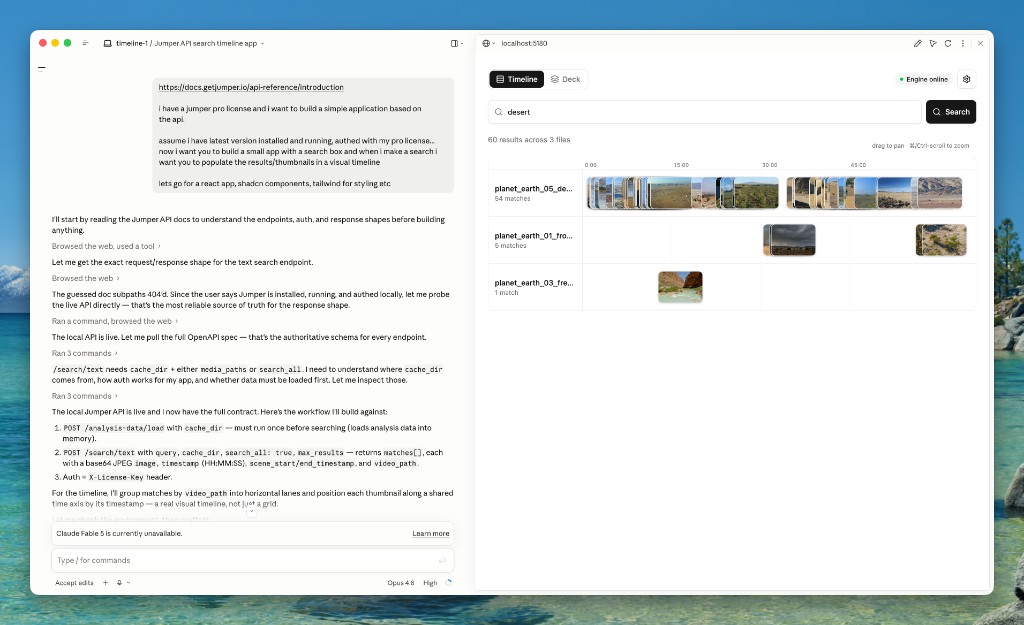
The first version of the app was a bit crude, but the impressive part was that it was working. I just had to paste my license key and the path to the Jumper analysis directory, and we could search and get results! Exciting!
From here I just went from the top of my head. What if instead of a grid of thumbnails, you’d get the Jumper results as a deck of cards? That you could swipe through and save the ones you like?
A few minutes later, there it is.
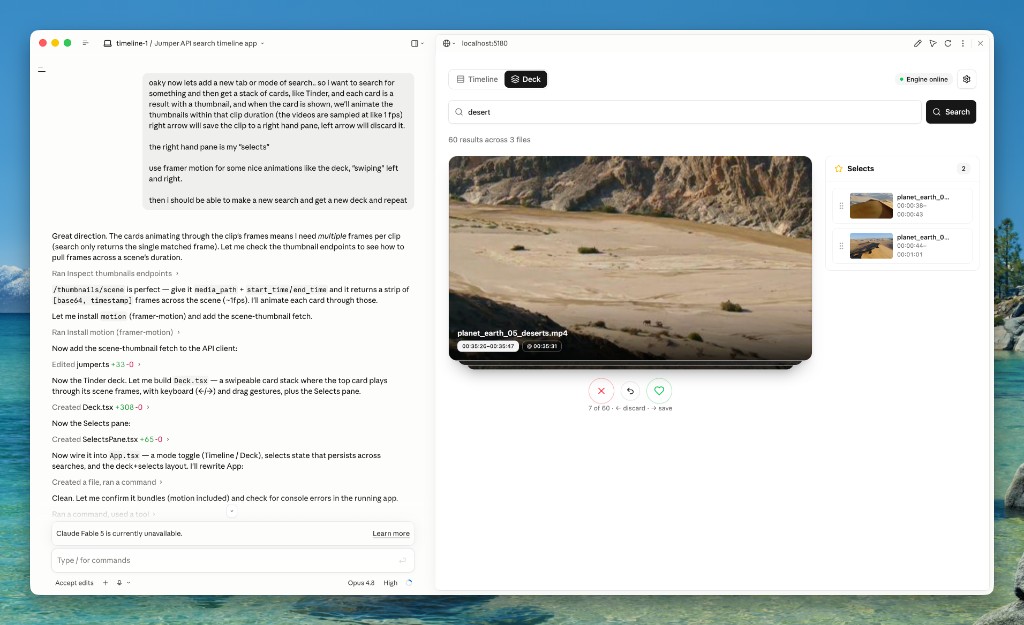
The app lets me search through my footage and view the results as a deck of cards. I can swipe through the results, save the ones I like.
Now whats next? What if you could drag a result to Finder to export it as a new clip? Let’s ask and see what happens.
And presto! It works!
Want to add a button that exports all saved results as individual clips? Im sure I could do it in no time, but I’ll leave that as an exercise for the reader.
Jumper does the heavy lifting
Obviously, the interesting part here is not this little app itself. The interesting part is how little work it took to create a completely new tool, that I dare to say never existed before (probably shouldn’t!).
Apart from the increasingly smart LLM agents of today, there are two things that make this possible:
- Jumper runs in the background and handles the foundational stuff: analysing footage, searching visually and semantically, working with media, and returning useful results through the API.
- The documentation is good enough that the agent can figure out how to build on top of it.
That means the app you build on top does not need to start from scratch and solve video AI, indexing, face recognition, search, media analysis, NLE integration, etc. Instead you can focus on your workflow and build tools that are specific to your needs.
You do not need to be a programmer
Personally I think this could be a new paradigm for the editing community. Plugins and tools have long been a part of the editing ecosystem, but they have always been built by programmers. Now with the help of AI, you can build your own tools and plugins without having to be a programmer.
Try it and show us what you build
If you have a Jumper Pro licence and access to a coding agent, we strongly recommend giving the API a try. You can start small and build it out as you go. Or perhaps you already have a specific idea in mind? Either way, it’s a lot of fun and a great way to get started.
Some helpful tips on the journey:
- Keep Jumper running — the API is local, so your app talks to the Jumper backend on your machine
- Analyze your footage in Jumper first; search only works on media that has already been processed
- Start with the basics: a search box, a list of results, proof that the connection works
- Sometimes it can be better to add one feature at a time instead of trying to one-shot the whole app
- Describe what you want in plain English, including who will use it and what the annoying step is today
- Point the agent at the API reference and let it read the OpenAPI spec
- When prompted, give it your licence key and the path to your Jumper analysis directory
- Most agents will default to javascript apps but if you prefer something else, like a command line app (CLI) say so early
- If you care about the user interface stack you should also be explicit (some of the most common app setups are javascript with React, Tailwind, shadcn etc.)
- If something breaks, paste the error and ask the agent to try again. That is usually faster than debugging it yourself
- You’re not limited by the Jumper functionality, you can integrate several other tools, services, or APIs into the same app
If you build something cool, useful, chaotic, cursed, or all of the above, please share it with us. Send an email to [email protected] or join the Discord. We would love to see what you build!